25 Şubat 2020 Salı

NetBackup / 5240 Appliance disk drive configuration

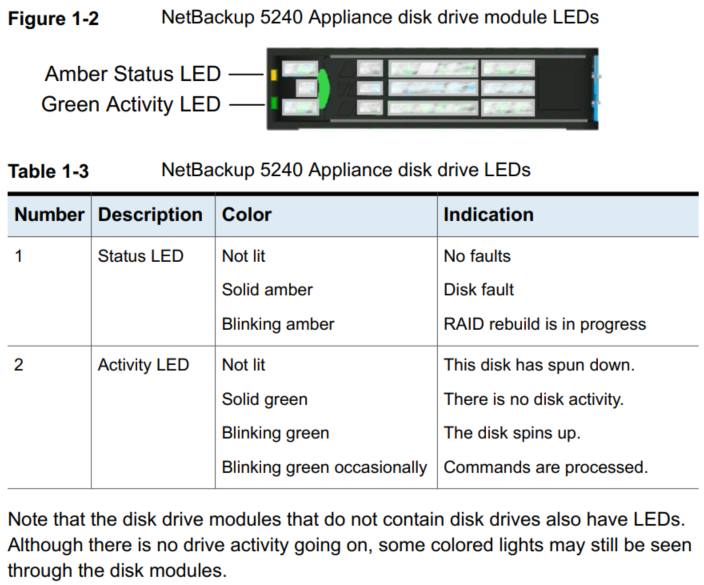
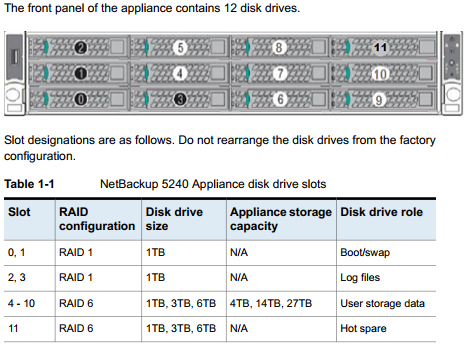
NetBackup 5240 Appliance contains 12 SAS hard disk drives. 

The appliance uses the disk drive that is located in slot 11 as a hot-spare disk. 

If one of the disk drives fails in slots 4 through 10, the appliance automatically initiates a RAID 6 rebuild operation. It rebuilds the RAID 6 array by using the hot-spare disk drive in slot 11. 

After you replace the failed disk drive, the appliance then copies the information from the disk drive in slot 11 to the new replacement disk. 

When the copy operation finishes, the disk drive in slot 11 again becomes the hot-spare disk.


31 Ocak 2020 Cuma

robocopy

robocopy <Source> <Destination> [<File>[ ...]] [<Options>]

example:
robocopy Source Destination /E /COPY:DATSOU /R:10 /W:3 /ZB /NP /TEE /LOG+:D:\FileCopy01.log

/e                 Copies subdirectories. Note that this option includes empty directories.
/copyall       Copies all file information (equivalent to /copy:DATSOU).
/r:<N>         Specifies the number of retries on failed copies. 
/w:<N>       Specifies the wait time between retries, in seconds.
/zb               Uses restartable mode. If access is denied, this option uses Backup mode.
/np               Specifies that the progress of the copying operation.
/tee              Writes the status output to the console window, as well as to the log file.

30 Ocak 2020 Perşembe

EMC DD / List & Delete SQL Backups

EMC DD üzerinde, 1 günden eski SQL backupları görüntülemek:

ddbmexptool -l -n mssql -z "C:\Program Files\DPSAPPS\MSAPPAGENT\config\ddconfig.cfg" -e "1 days ago"


EMC DD üzerinde, 15 günden eski SQL backuplarını silmek:

ddbmexptool -d -n mssql -z "C:\Program Files\DPSAPPS\MSAPPAGENT\config\ddconfig.cfg" -e "15 days ago"

7 Ocak 2020 Salı

VMware / Windows Server 2012 R2 - Access is denied

Windows Server 2012 R2 çalışan sistemde Access is denied hatası ile karşılaşıldığında.


Çözüm için linkte belirtilen düzenleme uygulanabilir.  https://kb.vmware.com/s/article/1012225
  1. Power off the virtual machine.
  2. Right-click the virtual machine and select Edit Settings.
  3. Click the VM Options tab.
  4. Click Advanced > Edit Configuration > Add Row.
  5. Insert a new row with the name devices.hotplug and a value of false.
  6. Power on the virtual machine.

24 Aralık 2019 Salı

VMware / Unable to passthrough a USB smart card reader to a guest operating system in ESXi version 6.5 and later

ESXi üzerinde usb token kullanmak istediğimizde aşağıdaki hata mesajı ile karşılaşabiliriz.


Status: Cannot connect 'path:0/1/0/1' to this virtual machine. The device was not found.


USB aygıtı kullanabilmek için sanal makine kapalı iken .vmx dosyasına aşağıddaki satır eklenmeli.

  • Power of the VM
  • Append the following line to your VM configuration (.vmx)
    usb.generic.allowCCID = "TRUE"
Düzenleme sonrası sanal makine ayarlarının değiştirilmesi bu değişikliğin ezilmesine sebep olabilir.

Aynı ayarları sanal makine üzerinden de yapabiliriz.


Raporları oluşturmak için Flex üzerindeki master server'a PuTTY üzerinden appadmin ile giriş yapın ve "sudo -i" ile root kulla...